Sending cold emails at scale can help sales teams, recruiters, agencies, consultants, and businesses reach more prospects in less time. But there is one common problem: the more emails you send, the easier it is for your outreach to start sounding generic.
A message that says, “Hi, I hope you’re doing well. We would love to connect with your company,” is unlikely to stand out when someone receives dozens of similar emails every day.
The solution is not to choose between scale and personalization. With the right process, you can send cold emails at scale while still making each message relevant to the recipient.
In this guide, we’ll explain how to create a scalable cold email process, personalize messages efficiently, organize your prospect data, and use mail merge and automation to reduce repetitive work.
What Does Sending Cold Emails at Scale Mean?
Sending cold emails at scale means reaching a large number of prospects who have not previously interacted with your business, using a structured and repeatable outreach process.
Instead of manually writing every email, you create a campaign framework that includes:
- A defined target audience
- A prospect list
- Personalization fields
- An email template
- A follow-up process
- Tracking and measurement
- A system for sending emails efficiently
The goal is not simply to send more emails.
The goal is to increase the number of relevant conversations without sacrificing the personal touch that makes cold outreach effective.
Why Personalization Matters in Cold Email
Personalization helps show prospects that your email was written with their situation in mind.
Compare these two approaches.
Generic:
“Hi John,
We help businesses improve their sales and would love to discuss how we can help your company.”
Personalized:
“Hi John,
I noticed that your team recently expanded its sales operations. We work with growing teams to simplify their prospecting process, so I thought this might be relevant to you.”
The second email gives the recipient a reason to pay attention.
Personalization can include more than just adding someone’s first name. You can personalize an email using information such as:
- First name
- Company name
- Job title
- Industry
- Location
- Product or service
- Recent company activity
- Business challenge
- Campaign or event
- Relevant website or content
The key is to use information that actually makes the message more relevant.
The Challenge: Personalization vs. Scale
Writing 20 personalized emails manually may be manageable.
Writing 200 or 2,000 personalized emails manually is a completely different challenge.
This is where many outreach teams face a choice:
Option 1: Send generic emails quickly.
Option 2: Spend hours manually personalizing every email.
Neither approach is ideal.
A better solution is to build a system where the repetitive parts of email creation are automated while the information that matters remains personalized.
How to Send Cold Emails at Scale Without Losing Personalization
1. Define Your Target Audience
Before creating an email template, decide exactly who you want to reach.
A broad list can make personalization difficult because every prospect may have different needs.
Instead, create smaller audience segments based on relevant characteristics.
For example:
| Segment | Example |
|---|---|
| Industry | SaaS companies |
| Company size | 50–200 employees |
| Job role | Sales leaders |
| Geography | United States |
| Business stage | Growing companies |
A more focused audience makes it easier to create messaging that feels relevant to the people receiving it.
2. Build a Clean Prospect List
Your prospect database is the foundation of your cold email campaign.
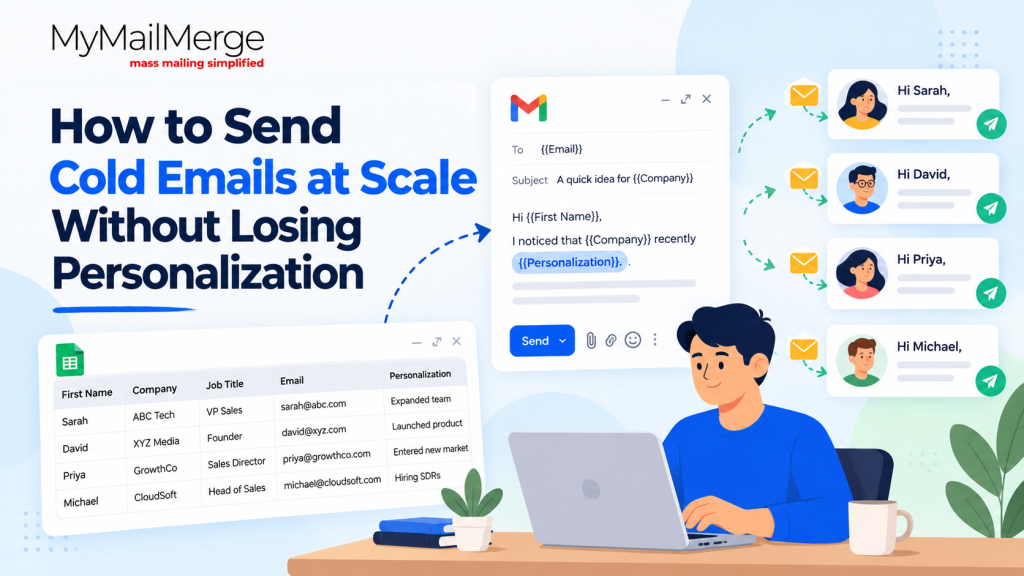
A simple Google Sheet can contain columns such as:
| First Name | Last Name | Company | Job Title | Industry | Personalization | |
|---|---|---|---|---|---|---|
| Sarah | Miller | ABC Tech | VP Sales | sarah@example.com | SaaS | Recently expanded sales team |
| David | Lee | XYZ Media | Founder | david@example.com | Media | Launched new product |
Keeping prospect information organized makes it much easier to personalize emails later.
Before sending a campaign, review your list for missing information, incorrect email addresses, duplicates, and irrelevant contacts.
3. Create a Strong Base Email
Your email template should provide the basic structure of your message without trying to say everything.
A simple cold email can include:
Opening: Establish relevance.
Context: Explain why you’re reaching out.
Value: Show how you may be able to help.
Call to action: Give the recipient one simple next step.
For example:
Hi {{First Name}},
I noticed that {{Company}} is currently {{Personalization}}.
We help {{Target Audience}} with {{Specific Problem}} so they can {{Desired Outcome}}.
Would you be open to a quick conversation next week?
Best,
{{Your Name}}
The template provides the structure, while the variables make each email more relevant.
4. Use Personalization Fields Beyond the First Name
Adding {{First Name}} to every email is technically personalization, but it is not enough to make an outreach campaign feel genuinely personalized.
Consider creating additional fields such as:
{{Company}}{{Job Title}}{{Industry}}{{Recent Activity}}{{Pain Point}}{{Relevant Product}}{{Custom Opening}}
For example:
Hi {{First Name}},
I saw that {{Company}} recently {{Recent Activity}}. Since you lead {{Department}}, I thought this might be relevant to your team.
This approach allows you to maintain a consistent campaign while changing the details that matter.
5. Segment Your Campaigns
One template does not have to work for everyone.
Instead, create different versions of your campaign for different audiences.
For example:
Campaign A — SaaS Founders
Focus on growth and customer acquisition.
Campaign B — Sales Leaders
Focus on prospecting efficiency and pipeline generation.
Campaign C — Marketing Teams
Focus on campaign performance and audience reach.
The more relevant the message is to a particular audience, the less personalization you may need to add manually to make it feel appropriate.
6. Use Mail Merge to Automate Repetitive Work
Once your prospect data and email template are ready, a mail merge tool can connect the two.
Instead of copying and pasting information into every email, your spreadsheet can provide the personalization data automatically.
For example:
Google Sheet
| First Name | Company | Role | Custom Message |
|---|---|---|---|
| Sarah | ABC Tech | VP Sales | Recently expanded the sales team |
| David | XYZ Media | Founder | Launched a new product |
Your email template can then use those fields:
Hi {{First Name}},
I noticed that {{Company}} {{Custom Message}}.
I wanted to reach out because…
This allows you to send personalized emails at scale without manually editing every message.
Tools such as My Mail Merge can help streamline this workflow by connecting your email campaign with spreadsheet-based prospect data.
7. Keep the Email Short
Scaling personalization does not mean writing longer emails.
In fact, short emails are often easier to personalize and easier for recipients to understand.
A useful cold email generally answers three questions quickly:
- Why are you contacting me?
- Why should I care?
- What should I do next?
Remove unnecessary introductions, long company descriptions, and multiple calls to action.
One clear message is easier to personalize and easier to scale.
8. Make the Call to Action Simple
Avoid giving prospects too many choices.
Instead of:
Would you be available Tuesday, Wednesday, Thursday, or Friday for a 30-minute call?
Try:
Would you be open to a quick conversation?
Or:
Is this something you’re currently exploring?
A simple CTA reduces friction and makes it easier for the recipient to respond.
9. Use Follow-Ups Carefully
A single email may not get a response, which is why follow-ups are an important part of many outreach campaigns.
However, follow-ups should not simply repeat the original email.
You can use a simple sequence:
Email 1: Initial outreach
Email 2: Short follow-up with additional context
Email 3: Useful resource, example, or specific question
Email 4: Polite final follow-up
Each follow-up should have a reason for being sent.
10. Track Your Campaign Performance
Once you start sending cold emails at scale, measure what is happening.
Depending on your email tool, useful metrics can include:
- Emails sent
- Delivery rate
- Open rate
- Click rate
- Reply rate
- Positive reply rate
- Meetings booked
- Unsubscribe rate
Don’t focus only on how many emails you send.
A campaign that sends 1,000 emails but generates very few relevant conversations may need better targeting or messaging.
Example: Turning One Email Into a Personalized Campaign
Suppose you’re reaching out to 100 sales leaders.
Instead of manually writing 100 emails, create a spreadsheet with information such as:
| First Name | Company | Role | Recent Activity | Pain Point |
|---|---|---|---|---|
| Sarah | ABC Tech | VP Sales | Expanded sales team | Prospecting |
| Michael | XYZ SaaS | Head of Sales | Entered new market | Pipeline |
| Priya | GrowthCo | Sales Director | Added SDRs | Outreach efficiency |
Your template can then combine these fields:
Hi {{First Name}},
I noticed that {{Company}} recently {{Recent Activity}}.
Teams going through this stage often run into challenges with {{Pain Point}}.
We help sales teams streamline their outreach without adding more manual work.
Would it be worth exploring?
The campaign can reach 100 prospects, but each recipient receives a message containing information relevant to them.
That’s the core idea behind personalization at scale.
Common Cold Email Mistakes to Avoid
- Using Only First-Name Personalization
Adding a recipient’s first name is not enough. Include relevant details that explain why you’re reaching out to them. - Sending the Same Message to Everyone
Different audiences have different needs. Segment your prospects and adjust your messaging accordingly. - Over-Personalizing the Email
Too many personal details can make an email feel automated or intrusive. Focus on one or two meaningful details. - Writing Long Emails
Keep your cold emails concise and focused. Make it easy for the recipient to understand your purpose and next step. - Ignoring Data Quality
Incorrect names, outdated job titles, or broken personalization fields can make your outreach look careless. Check your data before sending. - Using Too Many Calls to Action
Give the recipient one clear next step instead of asking them to do several things. - Skipping Email Testing
Send test emails before launching your campaign to check personalization fields, formatting, links, and attachments. - Focusing Only on Email Volume
Sending more emails doesn’t necessarily mean better results. Track meaningful metrics such as replies, positive responses, and meetings booked.
A Simple Cold Email at Scale Workflow
You can simplify the entire process into seven steps:
1. Define your audience
↓
2. Build and clean your prospect list
↓
3. Add useful personalization data
↓
4. Create a segmented email template
↓
5. Connect your spreadsheet to your mail merge tool
↓
6. Test the campaign and personalization fields
↓
7. Send, track, and improve
This process allows your team to spend less time on repetitive email preparation and more time on conversations with prospects.
Final Thoughts
The goal of cold email outreach should not be to send the maximum possible number of emails.
It should be to reach the right people with a message that feels relevant—at a scale your team can realistically manage.
By combining clean prospect data, audience segmentation, meaningful personalization, reusable templates, and mail merge automation, you can create a cold email process that is both efficient and personal.
Instead of choosing between scale and personalization, build a workflow that supports both.
And when your prospect data already lives in Google Sheets, a mail merge workflow can make that process much easier to manage.